
mailto: HTML e-mail link, what is it, how to create, examples and code generator.
What is mailto link
Mailto link is a type of HTML link that activates the default mail client on the computer for sending an e-mail.
The web browser requires a default e-mail client software installed on his computer in order to activate the e-mail client.
If you have Microsoft Outlook, for example as your default mail client, pressing a mailto link will open a new mail window.
How to create mailto link in HTML
The mailto link is written like regular link with extra parameters inside the href attribute:
| Parameter | Description |
|---|---|
| mailto:name@email.com | e-mail recipient address |
| cc=name@email.com | carbon copy e-mail address |
| bcc=name@email.com | blind carbon copy e-mail address |
| subject=subject text | subject of e-mail |
| body=body text | body of e-mail |
| ? | first parameter delimiter |
| & | other parameters delimiter |
mailto examples
Mail to email address
The code will generate this link:
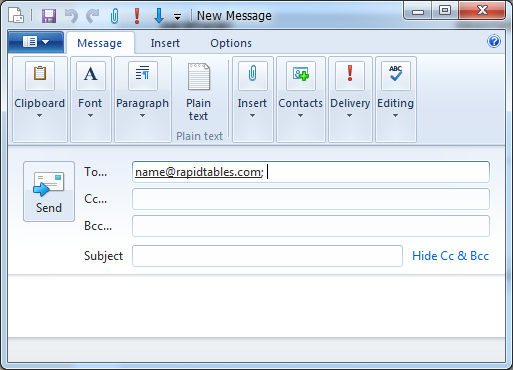
Pressing the above link will open a new mail window:
Mail to email address with subject
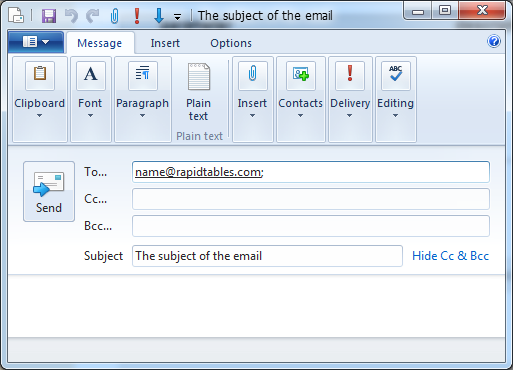
The %20 represents space character.
The code will generate this link:
Pressing the above link will open a new mail window:
Mail to email address with cc, bcc, subject and body
Send mail with cc, bcc, subject and body
The %20 represents space character.
The code will generate this link:
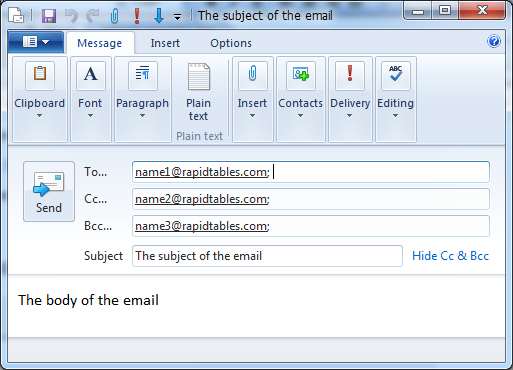
[Send mail with cc, bcc, subject and body](mailto:name1@calculatorx.com?cc=name2@calculatorx.com&bcc=name3@calculatorx.com&subject=The%20subject%20of%20the%20email&body=The%20body%20of%20the%20email)
Pressing the above link will open a new mail window:
How to add spaces in the mail's subject or body
You can add spaces by writing %20 in the text of the subject or body.
How to add line break in the mail's body
You can add newline by writing %0D%0A in the text of the body.
Mailto link code generator
Link text:
To:
Cc:
Bcc:
Subject:
Body:
Generated HTML code:
Generated link view (change code & press Update View):